



AdBlue ECU software explained
AdBlue Delete and Removal describe different approaches to SCR concerns. Understanding the control software helps distinguish a warning from its underlying cause. This guide explains how AdBlue dosing is managed, what common fault codes mean and why diagnostic checks matter before deciding on any work.
- MOBILE VISITS AT YOUR HOME OR WORK
- MOBILE APPOINTMENTS 8AM–8PM
- LIFETIME SOFTWARE WARRANTY
- NO FIX, NO FEE
24/7 Emergency Callouts Available
Emergency Mobile AdBlue Assistance. Additional emergency callout charge applies. Subject to availability.
- Same-Day Appointments Subject to Availability
- Next-Day Appointments Subject to Availability
- Mobile Attendance at Home or Work
01Understanding the service
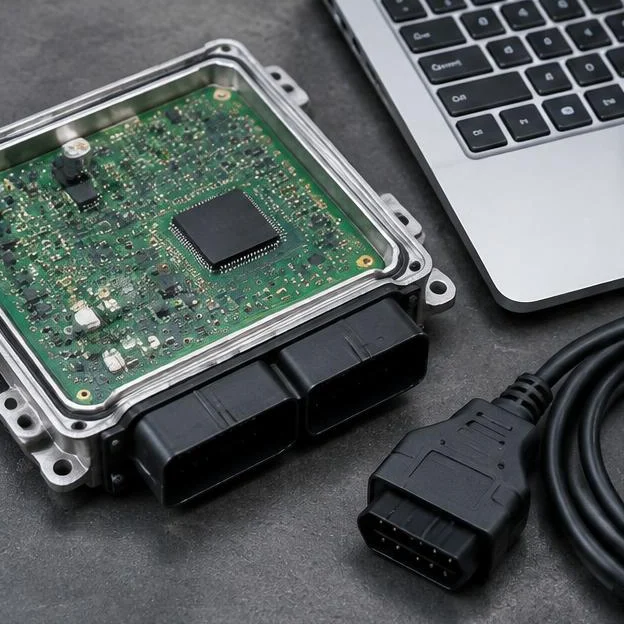
How AdBlue ECU Software Controls SCR
Depending on the vehicle, SCR operation is managed by the engine ECU, a separate dosing controller or several communicating modules. The system uses operating conditions and sensor data to calculate AdBlue dosing and monitor emissions performance. Low fluid level and certain confirmed faults can trigger warnings and, on some vehicles, a restart-prevention countdown. A full tank does not rule out pressure, dosing, sensor or electrical faults. Restart prevention is not the same as switching off an engine that is already running.
- AdBlue level and temperature monitoring, with other measurements depending on the system
- Pump pressure, heating and dosing control
- Exhaust temperature and NOx sensor data
- SCR performance monitoring and fault recording
- Warning and restart-restriction logic specific to the vehicle
Warnings Do Not Necessarily Mean Software Corruption
A persistent refill warning, engine warning light or countdown can have several causes. These include an unrecognised refill, unsuitable or contaminated fluid, insufficient reductant pressure, crystallisation, a dosing problem, sensor faults or wiring defects. Software updates may address documented issues on particular vehicles, but a warning alone is not evidence of corrupted software. Diagnostic codes, freeze-frame data and live readings should guide the checks.
Make and Model Technical Considerations
SCR fitment and controller architecture vary by engine, build date and emissions specification. ECU families such as Bosch EDC17 cover many applications and do not identify one universal software procedure. Peugeot Partner and Citroën Berlingo diesels include both SCR-equipped BlueHDi variants and versions without AdBlue, depending on age and engine. Send your registration so we can check likely fitment; diagnostic identification may still be needed to confirm the installed controller and software version.
Diagnostic Procedures and Fault Codes
Diagnosis should include relevant engine and SCR modules, fault status, freeze-frame information and appropriate live-data or component tests. Generic code descriptions indicate the condition detected, not the part that must be replaced. Manufacturer-specific descriptions and test procedures should be checked. A separate DPF fault must not be treated as proof of an AdBlue software problem.
- P20E8: reductant pressure too low; investigate pressure generation, delivery and measurement as applicable.
- P204F: reductant system performance, bank 1; a broad system fault requiring further tests.
- P207F: reductant quality performance; this does not by itself prove that the tank contains poor-quality fluid.
- P2002: diesel particulate filter efficiency below threshold, bank 1; this concerns the DPF rather than specifically identifying an SCR fault.
- After a repair, some systems require prescribed priming, adaptations, validation checks or a restart-restriction reset.
Information That Helps Narrow Down the Fault
The most useful starting point is the exact vehicle specification and a clear account of the symptoms. Avoid assuming that every diesel within a model range has AdBlue or that every countdown has the same cause. Send your registration if you are unsure about fitment.
- Registration, mileage and current postcode
- Exact dashboard wording and remaining countdown distance
- Whether the engine starts and whether power is reduced
- When AdBlue was last added and approximately how much
- Complete fault codes and details of recent repairs or software work
What Happens When We Visit?
From booking to completion, our experienced mobile technicians make the process straightforward.
- 1
Book Your Appointment
We confirm your vehicle, location, service and appointment.
- 2
Technician Calls With ETA
On the day, your technician calls with an estimated arrival time.
- 3
We Arrive & Diagnose
We connect diagnostic equipment, check the vehicle and identify relevant faults.
- 4
ECU Software Work
We read the original ECU software, prepare the AdBlue modification and apply it.
- 5
Final Checks & Resets
Final diagnostics, applicable fault-code resets and checks to confirm the agreed work is complete.
- 6
Payment & Receipt
We take payment, provide a receipt and explain the applicable software warranty.
02Why choose AdBlue Solutions
- Clear Quotation Before Booking
- Experienced Technicians
- 4.9/5 Google Rating • 535+ Reviews
- Nationwide Mobile Service Across England
- No Fix, No FeeSubject to terms
- Lifetime Software WarrantyCovers the software we install
- 24/7 Emergency Callouts AvailableAdditional emergency callout charge applies
Check Your AdBlue Fault Code
Enter a diagnostic code to explore its meaning and the information to send with your enquiry.
8 common codes
- P20E8
Fault name
Reductant pressure too low
What it means
The system has reported insufficient reductant pressure. Diagnostic checks help establish the cause, rather than assuming a failed pump.
VIEW FAULT DETAILS - P20EE
Fault name
SCR NOx catalyst efficiency below threshold
What it means
SCR NOx reduction efficiency has been reported below its expected threshold. The full scan and sensor readings help identify possible causes.
VIEW FAULT DETAILS - P204F
Fault name
Reductant system performance, bank 1
What it means
The code concerns SCR operation or monitoring. Read it alongside the full scan and vehicle-specific information.
VIEW FAULT DETAILS - P2200
Fault name
NOx sensor circuit, bank 1
What it means
The code concerns a NOx sensor circuit or signal. It does not alone confirm which part needs attention.
VIEW FAULT DETAILS - P229F
Fault name
NOx sensor circuit range/performance, bank 1 sensor 2
What it means
The code concerns a NOx sensor circuit or signal. It does not alone confirm which part needs attention.
VIEW FAULT DETAILS - P2047
Fault name
Reductant injection valve circuit/open, bank 1 unit 1
What it means
The code concerns a dosing or aftertreatment injector. Check the fitted system and full scan before assuming a cause.
VIEW FAULT DETAILS - P203F
Fault name
Reductant level too low
What it means
The system reports that the reductant level is too low. Check the actual fluid level and whether the reported level is accurate.
VIEW FAULT DETAILS - P207F
Fault name
Reductant quality performance
What it means
The system has reported reductant quality performance. The code alone does not identify the cause.
VIEW FAULT DETAILS
ADBLUE WARNING ON YOUR DASHBOARD?
Send us your registration, postcode and diagnostic fault code. We'll check the details and explain the available mobile service options.
Customer questions
Questions customers ask us
Still unsure? Send us your registration and a photo of the warning on WhatsApp.
Ask on WhatsAppWhat is AdBlue Delete?
AdBlue Delete generally means modifying control software to disable some or all SCR dosing, monitoring or associated restart-restriction functions. The implementation varies by vehicle and controller. It does not repair failed components or guarantee that unrelated engine faults, reduced power or starting problems will disappear.
What is AdBlue Removal?
AdBlue Removal is often used to describe an electronic SCR bypass rather than physical removal of the tank or exhaust components. The term alone does not establish which functions are changed. Control arrangements vary, and NOx sensor data may serve functions beyond AdBlue dosing.
What is the difference between AdBlue Delete and AdBlue Repair?
AdBlue Repair aims to restore correct SCR operation through diagnosis and appropriate work, such as wiring repairs, component replacement or a manufacturer-specified software update. AdBlue Delete changes system operation rather than repairing the underlying defect. Neither approach should be described as a guarantee against every future warning or breakdown.
What is an AdBlue Fix?
An AdBlue Fix is a general term for resolving an AdBlue or SCR problem, not a specific procedure. Depending on the findings, it may involve correcting fluid level or quality, repairing wiring, addressing a dosing fault or applying an applicable software update. Clearing codes or resetting a countdown alone does not resolve an active fault.
What vehicle and postcode information do you need for a quote?
Please send your full registration, current postcode, mileage and the exact warning message. Your registration helps us check the likely engine and SCR fitment, while your postcode helps us assess mobile coverage. The installed ECU hardware and software identifiers normally need to be read from the vehicle before compatibility can be confirmed.
Can I send my warning light photo on WhatsApp?
Yes. Send a clear dashboard photo, including any remaining-distance countdown, along with your registration. Include any diagnostic report you already have and say whether the engine currently starts. Photos help with initial assessment but cannot reliably distinguish a software issue from a hardware fault.
Do you offer 24/7 emergency callouts?
Yes. Our standard hours are Monday to Sunday, 8 AM to 8 PM. Emergency callouts are available 24 hours a day, 7 days a week, subject to location and availability. An additional emergency callout charge applies and is confirmed before dispatch.
Related
Get Your AdBlue Quote
Enter your registration, postcode and mobile number. We'll check your vehicle and reply with a quotation. You can add a photo of your dashboard warning in the WhatsApp chat.
Countdown about to hit zero?
Call or WhatsApp with the warning, miles remaining and where the vehicle is. Emergency callouts carry an additional charge, confirmed before dispatch.